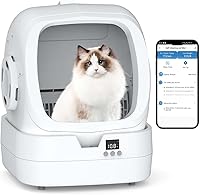
Neakasa M1 Troubleshooting: Common Problems and Fixes
For Neakasa M1 troubleshooting, check the litter box’s position, power, waste drawer, and app connection first. Keep your cat away while checking the unit, and follow the manual before restarting or clearing an alert.
On this page (7 sections)
- Why is the Neakasa M1 not starting a cleaning cycle?
- Why does the Neakasa M1 stop during cleaning?
- Why is the Neakasa M1 app offline?
- Why won't the waste drawer close or the bag stay in place?
- Why is the M1 Plus leaking or letting odors escape?
- When should you contact Neakasa support?
- Which Neakasa M1 troubleshooting steps should you try first?
For Neakasa M1 troubleshooting, check power, the unit’s position, the waste drawer, and app alerts first. Keep your cat away while you inspect the box, and use the manual for any alert-specific reset or cleaning steps.
A safety sensor can pause a cleaning cycle when it detects movement, so don't assume every stop means the box is broken. If a warning keeps returning after basic checks, note what the app shows and contact Neakasa support.
Why is the Neakasa M1 not starting a cleaning cycle?
Check power, the waste drawer, and the area around the box before trying another cycle. Keep your cat clear, then consult the manual if an alert appears.
Confirm that the unit is connected to power and sitting as its instructions require. Make sure the waste drawer is in place and can close fully.
The M1 Plus has a six-array infrared system and a mechanism that limits the litter bed’s rotation angle. These features are designed to detect a cat’s movement, size, and position, and can pause cleaning when the sensors detect activity.
Don't place your hands inside the litter bed while it is moving or try to force it through a cycle. If the box remains stopped after your cat has left and the drawer is seated, follow the manual's troubleshooting steps or contact support.
For a general check sequence that applies across automatic boxes, see what to check when an automatic litter box is not working.
Why does the Neakasa M1 stop during cleaning?
A pause can be a safety response when the sensors detect movement or the cat's position. Wait until the cat is away, then check the app and the manual before restarting.
The M1 Plus supports cats from 3.3 to 33 lb. For kittens under 3.3 lb, enable Kitten Mode in the Neakasa app.
Keep toys, hands, and other moving objects away from the sensor area during a cycle. Don't try to bypass a safety feature to make the litter bed continue moving.
If stops recur with no cat nearby, look for an alert in the app and record when it occurs. That information can help Neakasa support narrow down the problem.
What if a sensor alert keeps returning?
Follow the instructions for the exact alert shown in the app or manual. The right step can depend on which condition the unit detected.
Move your cat to another room before inspecting the box. Check for anything obviously obstructing the unit, then let the cycle remain stopped until you can safely follow the documented steps.
Avoid unplugging and reconnecting the unit as a repeated workaround unless Neakasa’s instructions tell you to do so. If the same alert returns, contact support with the alert text and what you had already checked.
Why is the Neakasa M1 app offline?
The M1 Plus app features use 2.4 GHz Wi-Fi. Check that your phone and home network meet Neakasa's connection instructions before attempting setup again.
The app offers remote mode adjustment and activity tracking, including multi-cat tracking. A connection problem can affect those features without explaining a mechanical stop or a waste drawer that won't close.
Check the router band and follow the current setup steps in Neakasa's manual or app. If your router combines 2.4 GHz and 5 GHz networks, consult its instructions for connecting a device that requires 2.4 GHz.
For a broader look at connected and offline models, read whether automatic litter boxes need Wi-Fi or an app. If you use another brand, our Meowant litter box app connection guide covers a separate setup.
Why won't the waste drawer close or the bag stay in place?
Check that the bag is positioned inside the drawer and that its edges don't prevent the drawer from seating. Empty the drawer if needed, and follow the manual's bag replacement steps.
Neakasa's M1 replacement bags come in rolls. The M1 Plus package also includes 2 refill bag rolls.
The Neakasa bags measure 12.9 x 27.1 inches. For a third-party option, check its dimensions and compatibility, then make sure it doesn't bunch around the drawer opening.
A bag that slips or blocks the drawer can keep it from closing as intended. Don't force the drawer; remove and reposition the bag first.
Why is the M1 Plus leaking or letting odors escape?
Check that the waste drawer is closed and the bag is fitted correctly before looking for another cause. Stop using the unit if you see liquid outside it, then follow Neakasa's cleaning and support guidance.
The M1 Plus has a brush strip and composite sealing ring designed to contain odors and help prevent liquid seepage. Those features don't replace checking the bag, drawer, and surrounding floor for spills.
Remove waste and clean only as the manual directs. Don't pour liquid into the litter bed or use cleaners that the instructions don't allow.
For odor concerns beyond the M1, see whether self-cleaning litter boxes still smell. If the box is new to your cat, how cats respond to self-cleaning litter boxes may help with the transition.
When should you contact Neakasa support?
Contact Neakasa support when the same alert or failure remains after you follow the manual's checks. Share the alert, when it happens, and which steps you tried.
Stop the cycle if you see damaged parts, unusual movement, or a leak. Keep your cat away from the unit until you know it is safe to use.
Don't open the mechanism, bypass sensors, or attempt an electrical repair. If the app is the only issue, mention that the box still works mechanically; if it is a cycle or sensor issue, include those details instead.
Which Neakasa M1 troubleshooting steps should you try first?
For Neakasa M1 troubleshooting, start with power, a clear area, a seated waste drawer, and the app's alert. Keep your cat away while checking, and use the manual for any reset or cleaning procedure.
Choose the Neakasa M1 Plus if you need the M1 unit itself. Choose Neakasa’s replacement rolls for bags made for the M1 series, or compare the 120-count option, which is described as compatible with Neakasa M1 boxes.
For general operating questions, read how a self-cleaning litter box works. If cleaning is the issue, see our PETKIT Pura Max cleaning guide.
Frequently asked questions
Why is my Neakasa M1 not cleaning?
Check that the unit has power, the waste drawer is seated, and your cat is not inside or near the box. If the app shows an alert, use the manual and app instructions to identify it before restarting.
Don't reach into a moving litter bed; contact Neakasa support if the cycle still won't start.
Why does my Neakasa M1 keep stopping?
A stop can relate to a safety sensor detecting movement or to an alert shown in the app. Keep your cat clear, check the unit's position and waste drawer, then follow the manual for the specific alert.
If it repeats after those checks, share the alert details with Neakasa support.
Does the Neakasa M1 need Wi-Fi?
The Neakasa app uses 2.4 GHz Wi-Fi for remote mode changes and activity tracking. If those app features are offline, check that your network is 2.4 GHz and follow Neakasa's connection steps.
Wi-Fi trouble does not explain every cleaning issue, so check the unit itself and its alerts too.
Which bags fit the Neakasa M1?
Neakasa makes replacement waste bags for the M1 series, and compatible third-party bags are also sold. Check the bag dimensions and how they sit in the waste drawer before use.
A bag that bunches, slips, or blocks the drawer may interfere with closing it properly.